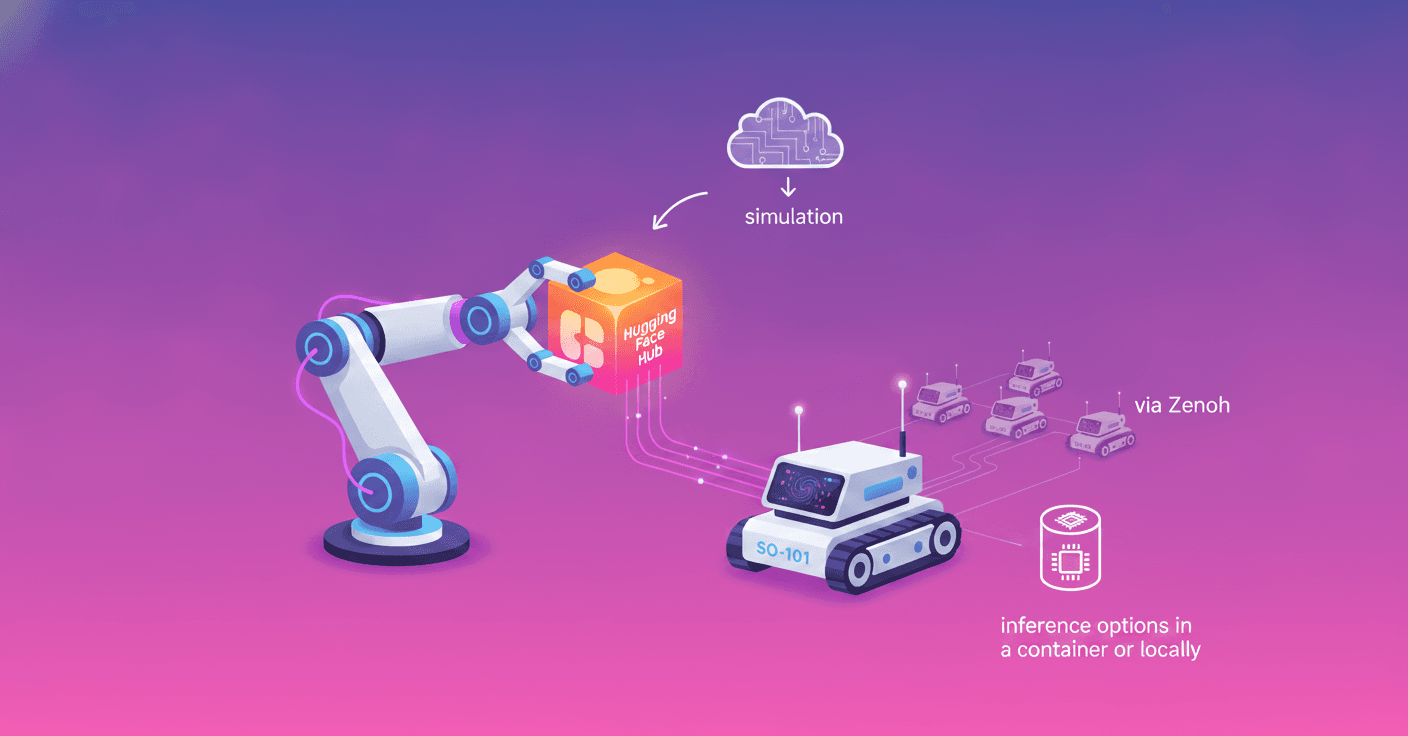
Having a robot, demonstration data on the Hugging Face Hub and a new task used to mean five different tools that didn’t talk to each other. Strands Robots and LeRobot stitch those pieces together: recording, dataset formatting, inference and hardware deployment become composable from a single agent.
What this integration delivers
Strands Robots (open source SDK, Apache 2.0) exposes the LeRobot stack as AgentTools that you can compose into a single Strands agent. The integration is intentionally thin: LeRobot keeps handling hardware recording and calibration, and Strands adds orchestration, simulation and the mesh for fleets.
What does that mean for you as a developer? That the same agent code can:
- Record demonstrations in simulation and write a
LeRobotDatasetidentical to the one produced on hardware. - Run a policy in simulation or against a local/external service (GR00T, LerobotLocal, Cosmos3, etc.).
- Deploy unchanged to the SO-101 in
realmode with a single argument. - Coordinate multiple robots via a peer mesh (Zenoh or Device Connect) without touching agent logic.
How it works: the practical flow in 5 steps
The demo bundles everything into a single agent. At a high level, the steps are:
- Build the agent with LeRobot
AgentTools. - Record a demonstration in MuJoCo and write a
LeRobotDataset. - Run a policy over that same dataset format.
- Switch
mode="real"and run the same agent against the physical SO-101. - Extend the command to a fleet using the Zenoh mesh.
The minimal Python version fits in five lines:
from strands_robots import Robot
from strands import Agent
arm = Robot("so100")  # mode="sim" by default
agent = Agent(tools=[arm])
agent("Pick up the red cube")
But what happens under the hood:
Robot("so100")returns simulation by default;mode="real"returns hardware managed by LeRobot.DatasetRecorderuses the same parquet + MP4 format in both sim and hardware. No data conversion.- Inference can come via the GR00T container (
gr00t_inference) or in-process withLerobotLocalPolicy(Hub models underlerobot/).
Requirements and useful commands
Main requirements:
- Python 3.12+ on Linux or macOS (Apple Silicon supported for MuJoCo).
- A Strands-compatible model provider: Amazon Bedrock, Anthropic, OpenAI, Ollama, or a local provider.
- To follow the example: Strands Robots with simulation extras, LeRobot and the mesh.
Install and run the example on your laptop (sim-only path, no GPU or credentials required):
pip install "strands-robots[sim-mujoco,lerobot,mesh]"
git clone https://github.com/strands-labs/robots.git
cd robots
export STRANDS_MESH_LOCAL_DEV=1
python examples/lerobot/hub_to_hardware.py
The recommended notebook is examples/lerobot/hub_to_hardware.ipynb. The default script uses a Mock policy so everything works without a checkpoint or GPU.
To record on hardware use LeRobot’s utilities directly:
lerobot-calibrate --robot.type=so101_follower --robot.id=my_follower
lerobot-calibrate --robot.type=so101_leader --robot.id=my_leader
lerobot-record \
  --robot.type=so101_follower --robot.id=my_follower \
  --teleop.type=so101_leader --teleop.id=my_leader \
  --dataset.repo_id=my_user/cube_picking \
  --dataset.single_task='Pick up the red cube and place it in the box' \
  --dataset.num_episodes=25 \
  --dataset.push_to_hub=true
Policies, containers and local paths
- GR00T: the agent can launch the container with
gr00t_inference(action="lifecycle", lifecycle="full", ...), pull the checkpoint from the Hub and expose the service so simulation can consume the actions. - LerobotLocal: ideal if you prefer in-process inference. It resolves models that follow the
config.jsonconvention inside thelerobot/organization. - Note:
LerobotLocalPolicyloads checkpoints withtrust_remote_code. DefineSTRANDS_TRUST_REMOTE_CODE=1and only load checkpoints from organizations you trust.
Fleet orchestration and security
The mesh uses Zenoh by default. Each Robot() and Simulation() joins the peer mesh automatically. With robot_mesh you can discover peers, send structured commands, broadcast and emit emergency stop.
- By default, actions that affect physical actuators (broadcast, emergency_stop, tell, send, stop) are gated behind a human-in-the-loop (HITL) approval in the terminal. This prevents a malicious prompt from authorizing critical actions.
- For deployments on untrusted networks, don’t use
STRANDS_MESH_LOCAL_DEV=1. In production enableSTRANDS_MESH_AUTH_MODE=mtlsand consider Device Connect for more robust discovery and routing.
Best practices and security considerations
- Don’t feed agents untrusted data without controls: prompt injection or malicious data can lead to unsafe orders in the physical world.
- Keep human approval for sensitive physical actions. You can adjust which actions require HITL with
STRANDS_MESH_HITL_ACTIONS. - On the training path: sim and hardware datasets share the same shape. That makes transfer learning easier, but validate the quality of simulated data before training policies for hardware.
Cleanup and returning to the previous state
After an example session:
- To stop GR00T:
agent.tool.gr00t_inference(action="stop", port=5555)
# or use lifecycle="teardown" to remove the container
- Disconnect serial ports if you used hardware.
- Local datasets live under
~/.cache/huggingface/lerobot/<repo_id>; delete them if you want to free disk space. Datasets you pushed to the Hub are untouched.
Why it matters
The key design decision is not to reinvent LeRobot: Strands adds the agent and natural-language orchestration layer, while LeRobot keeps responsibility over the hardware abstraction, calibration and dataset format. The practical result: every dataset on the Hub becomes a reusable asset for agents, and the line between sim and real becomes a deployment detail instead of an architectural change.
Interested in trying it? The example runs on your laptop without hardware, GPU or Hub credentials, and you can move to hardware by changing mode to real and pointing at your calibrated devices.
Original source
https://huggingface.co/blog/amazon/strands-lerobot-hub-to-hardware